Provide a reference
Start with a text description or a clear image showing the object, its silhouette, and the details that matter most.
Plain-language guide
What is hyper3d? It is an AI-assisted 3D creation workflow that turns text or images into a starting 3D asset, helping people move from an idea to a model faster.

The basic workflow
Hyper3D reduces the distance between a reference and a usable model, but the result still benefits from review, cleanup, and artistic direction.
Start with a text description or a clear image showing the object, its silhouette, and the details that matter most.
The system interprets the reference and builds a 3D form with geometry, materials, and a viewable structure.
Inspect proportions, topology, textures, and scale, then adjust the asset in a 3D editor or your target production tool.
Continue exploring
Different creators approach AI-generated assets with different goals, from rapid ideation to production support.
A useful mental model
The important change is not that every generated model is finished immediately; it is that the first believable form arrives much sooner.
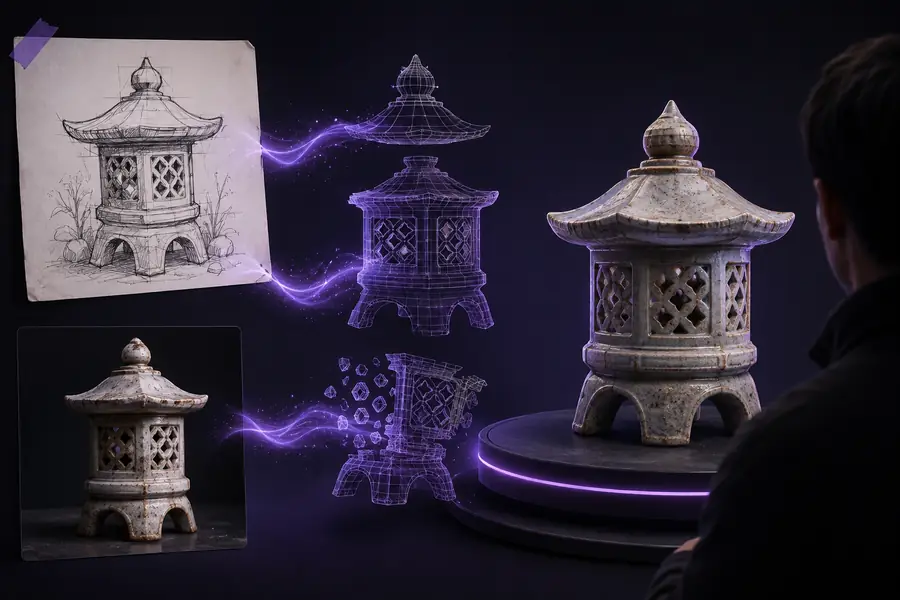
Treat the output as a strong starting point rather than a guaranteed final mesh. The closer the reference is to the intended subject, the easier it is to evaluate the result.
How the format evolved
AI 3D tools developed by combining familiar modeling ideas with faster visual inference and automated asset generation.
Artists built forms vertex by vertex, then created UVs, materials, and lighting through separate, highly specialized steps.
Photographs, concept art, and turnarounds helped artists block out recognizable forms before detailed modeling began.
New systems learned visual patterns from large collections of images and models, allowing them to produce a plausible first draft.
Today, Hyper3D-style tools are most useful when they accelerate blocking, exploration, and asset preparation without removing human review.
Honest caveats
A generated model can save time, but it does not replace judgment about topology, scale, materials, or the needs of a specific project.
A single image rarely shows the back, underside, internal structure, or true dimensions of an object.
WorkaroundUse multiple views, a turnaround, or manual edits to resolve areas the reference does not reveal.
The mesh may be recognizable but still need retopology, clean edge flow, or optimization for animation and real-time use.
WorkaroundInspect the geometry in your preferred 3D application and rebuild critical areas when deformation or performance matters.
The system can suggest a form, but it does not know the exact style, proportions, story, or visual hierarchy your project requires.
WorkaroundGive it a specific reference and use the output as an editable draft guided by deliberate human choices.
A generated result may still reflect restricted references, branded designs, or unclear source material.
WorkaroundUse references you have permission to use and review the asset before publishing or commercial deployment.
At a glance
These figures describe the workflow concept, not a promise that every generation will meet the same result or quality level.
Quick answers
The short answer is useful, but the right expectation matters just as much as the definition.
1
It is an AI-assisted method for creating a preliminary 3D asset from text or visual references.
That definition separates the generation step from the later work of checking, editing, and integrating the model.
2
Use Hyper3D as a starting point, then validate the mesh, materials, scale, and licensing before delivery.
A fast draft is valuable, but production quality depends on requirements that a reference image alone cannot fully specify.